Set Up the Cart Slider Widget on the Cart
The Retenzy Cart Slider Widget allows you to display the Retenzy cart experience on your store's cart page.
The widget is already enabled during the initial Retenzy setup, but you can also check or enable it again using the steps below.
1. Enable the Cart Slider from Retenzy
If you are currently in the Retenzy App:
-
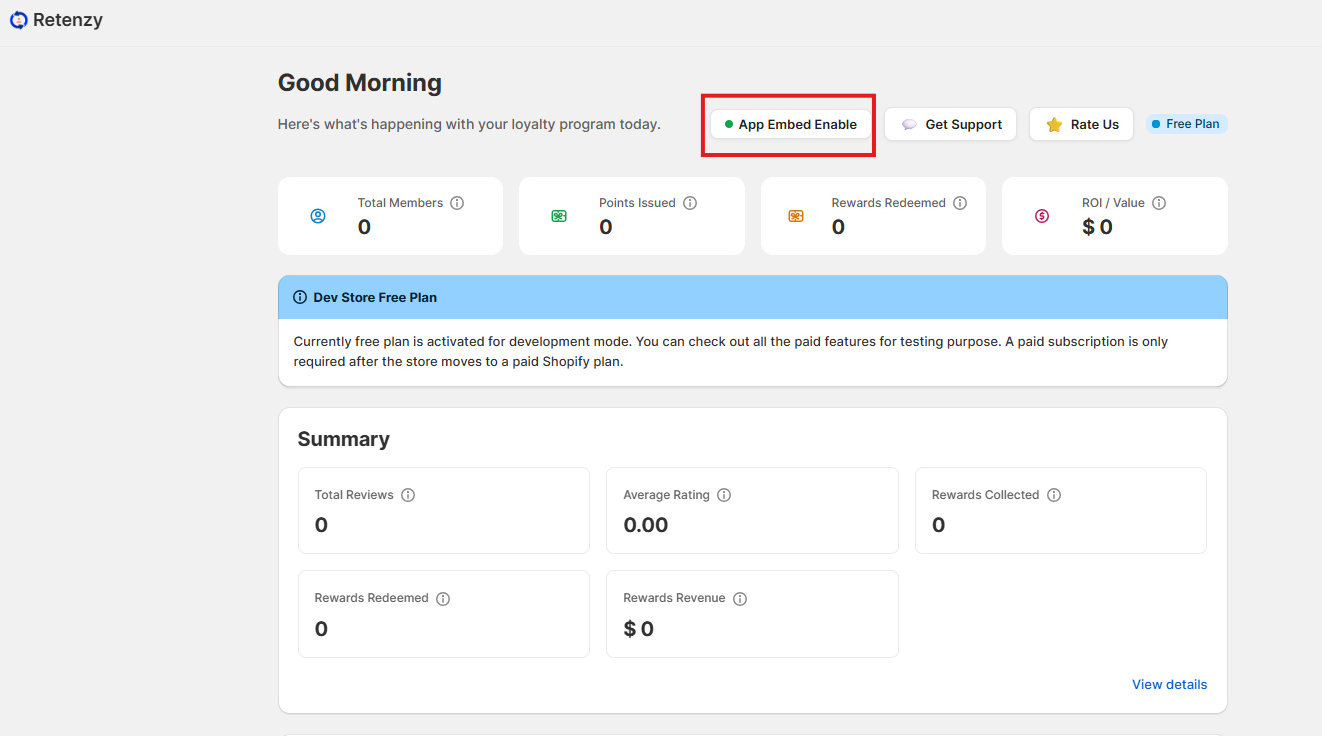
Go to the Home page
-
Click App Embed.
-
You will be redirected to the Shopify Theme Editor.
-
Find Retenzy Cart Slider in the available app embeds.
-
Toggle the widget ON.
-
Click Save to apply the changes.
2. Enable the Cart Slider from Shopify
If you are already in the Shopify Theme Editor:
-
From the top-left of the Theme Editor, click the App Embeds icon.
-
Find Retenzy Cart Slider in the available Retenzy app embeds.
-
Toggle the widget ON.
-
Click Save to apply the changes.
Once enabled, the Retenzy Cart Slider Widget will be live on your store's cart page.
